Your meetings, transcribed.
Never uploaded.
Every meeting note-taker sends a bot into your call and your audio to their cloud. MeetingScribe does neither — your computer was already in the meeting, so it records at the OS audio layer, transcribes on the Apple Neural Engine in about 90 seconds, and keeps everything as plain files on your Mac.
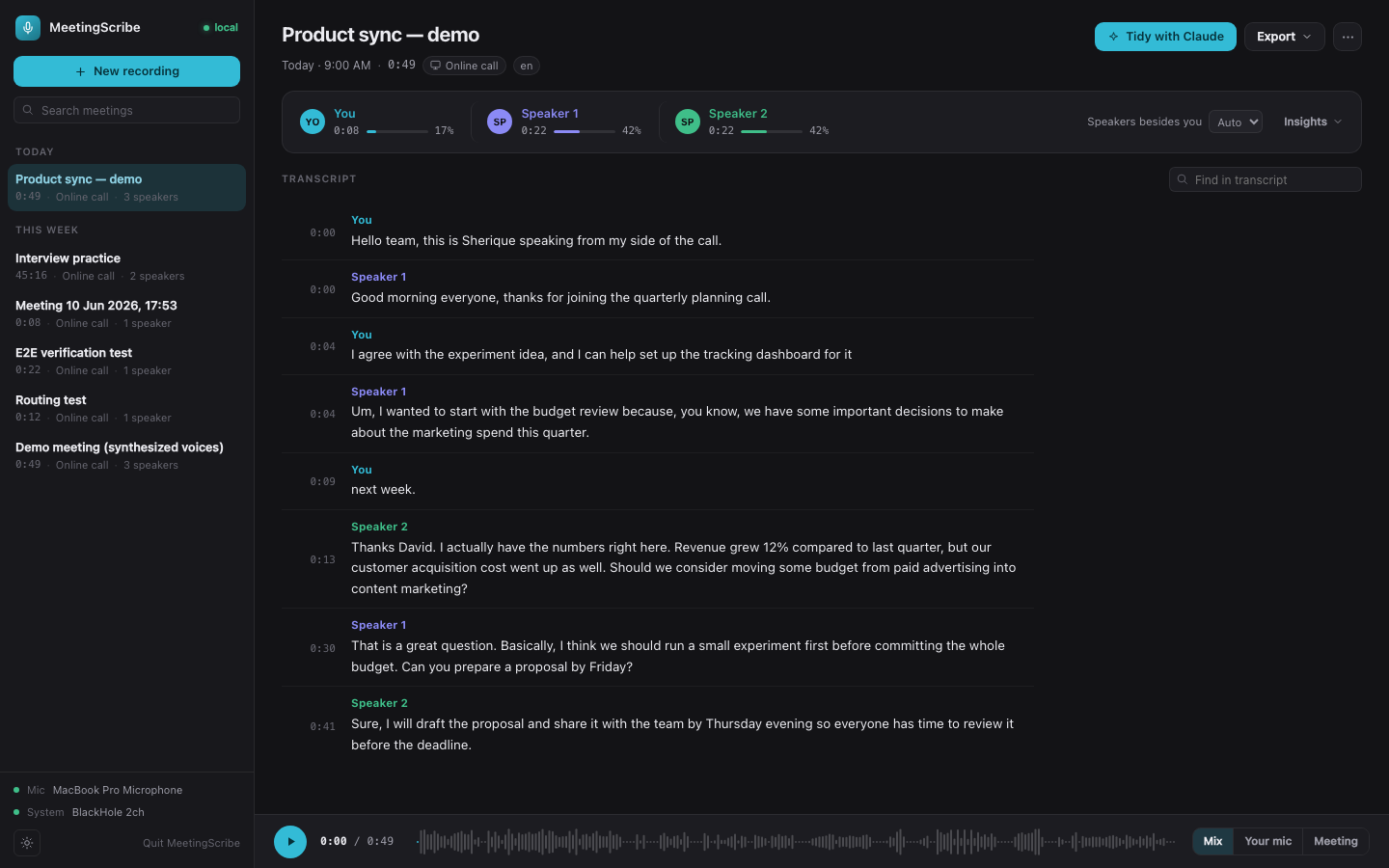
No bot joins your call. Nothing leaves your laptop.
Otter, Fireflies, Fathom — they all get audio the same way: a bot participant in your meeting, or a platform integration, plus your conversation uploaded to their servers. MeetingScribe taps a different layer entirely: the Mac's own audio system. That one architectural choice is where everything else falls out of — it works with any app that makes sound, nobody sees a recorder join, and the audio physically cannot leave the machine because no part of the pipeline needs a network.
Two tracks. That's the whole trick.
When you hit record, MeetingScribe builds a virtual audio device on the fly and splits the meeting into two synchronized recordings — and keeping them separate is what makes the transcript trustworthy.
Your microphone
Anything on this track is physically guaranteed to be you. No voice-matching guesswork — cloud tools record one mixed stream and have to infer which voice is theirs.
Everyone else
A clean copy of what comes out of your speakers, captured through a virtual loopback device — while you keep hearing everything normally. Routing happens automatically.
Transcribe on the Neural Engine
Apple's on-device speech engine — the same one behind Notes and Voice Memos — chews through both tracks at roughly 60× realtime with word-level timestamps, using about two seconds of CPU. Your laptop stays cold and silent.
Cancel the echo
No headphones? The other side's voice leaks from your speakers into your mic and gets transcribed twice. Because the system track is a perfect reference copy, the duplicates are detected and removed — single-stream tools have nothing to check against.
Fingerprint the voices
Each stretch of speech becomes a voice embedding; similar fingerprints cluster into speakers. The fingerprints are saved with the meeting, so if the split is ever wrong, picking the real speaker count re-clusters the whole transcript in a fifth of a second.
Name it from your calendar, polish it with Claude
Recordings name themselves after the calendar event you're in — read locally via EventKit, never a cloud API. And if you use Claude, an optional one-click tidy sends the transcript text (never audio) through your own subscription to merge leftovers and fix labels, with every edit validated locally.
A meeting is a folder.
No database, no account, no export step, no vendor. Every meeting lives in a folder named after it, holding plain files you can open in anything. If MeetingScribe vanished tomorrow, every transcript you ever made still opens in TextEdit.
| bot note-takers | meetingscribe | |
|---|---|---|
| gets audio via | a bot joins your call | the Mac's own audio layer |
| your audio | uploaded to their cloud | never leaves the laptop |
| works with | supported platforms only | anything that makes sound — calls, webinars, in-person |
| "you" in the transcript | guessed by voice match | physically certain — separate mic track |
| speed | minutes in a cloud queue | ~90 s on-device |
| cost | $10–30 / month | free, open source |
| your transcripts | their servers, their retention | plain files in your own folders |
One honest note: a bot announces itself to everyone on the call. MeetingScribe doesn't — telling people you're recording, and following local consent law, is on you.
Five minutes to your first transcript.
Grab the zip above or clone the repo. One setup script installs everything — including the free BlackHole audio driver that captures the other side of your calls — and drops a proper MeetingScribe.app in Applications. From then on it's a normal Mac app.
Needs a Mac (Apple Silicon recommended; the Neural Engine path needs macOS 26+, older versions use Whisper locally instead). Windows works too via the same dual-track trick on WASAPI. Transcription quality is best with headphones. First run downloads the speech models once; after that it's fully offline.